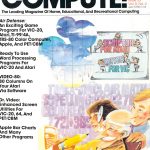


Source: Computer & Video Game Magazines – Compute! – Issue Number 35 – April 1983
Compute! was one of the most popular multi-format computer magazines of the 1980s. It covered mostly the popular 8-bit home computers of the time including the VIC-20, Commodore 64, TRS-80 Color Computer, Apple II, Atari 400/800, TI-99/4A, etc. Compute! also produced the very popular Commodore specific Compute!’s Gazette and a number of other computer specific publications. At more than 288 pages, the April 1983 issue of Compute! had a LOT in it, including:
Features
- Selecting The Right Word Processor – An overview of what a word processor is and what features you should look for. Some of these features include things like Block Move, Headers/Footers and Page-Numbering among other things. There are no actual product reviews in this article.
- Air Defense – A type in program for a game similar to Missile Command. It is in BASIC and was designed to work with the VIC-20, Atari 400/800, TRS-80 Color Computer, Apple II, TI-99/4A, and PET/CBM.
- VIC Editype: A Text Editing And Storage Program – A type-in program for the VIC-20. VIC Editype is basically a mini word processing program. Word processing seems to be the theme in this month’s issue.
- Scriptor: An Atari Word Processor – A somewhat more advanced type-in word processor for the Atari 400/800 written in both BASIC and machine language.
- Retirement Planner – This type-in program asks you a few questions and then helps you determine how much you should save/invest for retirement each year. There are versions here for the VIC-20, Apple II, Atari 400/800, TI-99/4A, and TRS-80 Color Computer.
Education and Recreation
- Typing Teacher – A type-in program to (ironically) teach you typing. Basically it measures your character speed and word speed by presenting random characters for you to type. There are versions here for the Atari 400/800, VIC-20, TI-99/4A and Apple II.
- Chutes for Atari – A type in program for the Atari 400/800 that uses 3D graphics or what passed for them then. It reminds me of a very, very primitive Star Fox.
- Cash Flow Manager – This article consists of instructions to create a monthly cash report and forecast spreadsheet that can be printed in VisiCalc.
- TI-99 Match-Em – A type-in program for the TI-99/4A for a matching game. This is one of those games where you have to select a square to see what is under it and then guess (or remember) where its match is. Milton Bradley produced a board game version creatively titled “Memory” that was a popular kids game in the 1980s but there have been endless variations.
- Atari Math Fun – A type-in educational math program for the Atari 400/800. It provides six categories and six skill levels. Honestly doesn’t sound like much fun to me.
Reviews
- VIC-20/C64 World Processor: The Quick Brown Fox – A very simple and easy to use word processor for the VIC-20 and Commodore 64 that came in cartridge format.
- Atari Data Perfect – A database program for the Atari 400/800 described as the most powerful yet for that computer. It was compatible with Letter Perfect (a word processor) making it easy to generate form letters and various record formats.
- VIC Practi-Calc – Essentially a much cheaper version of VisiCalc but for the VIC-20 and with fewer features.
- Paperclip Word Processor For PET/CBM – The PET/CBM were more business oriented but this was a popular word processor that was ported to several other computers.
- Silicon Office for PET – A combination of two applications, a word processing program and a database program. This was a relational database but with its own programming language.
- Turbocharger For Apple – A program for speeding up DOS commands for the Apple II. It also added the capability of date stamping files.
- Pathfinder for Atari – A game with a rather bizarre concept. You make your way through a multi-screen maze collecting nuclear waste which gives you energy. Another entity is trying to do the same thing. You must beat him while avoiding his mine-laying friend and phantoms.
- ZX-81 Home Computer Package For Sinclair/Timex – A package of four programs for the ZX-81/TS-1000. It includes titles that are mostly self explanatory including Etch-A-Screen, Music Composer, Checkbook Balancer and Billboard (scrolls messages across the screen).
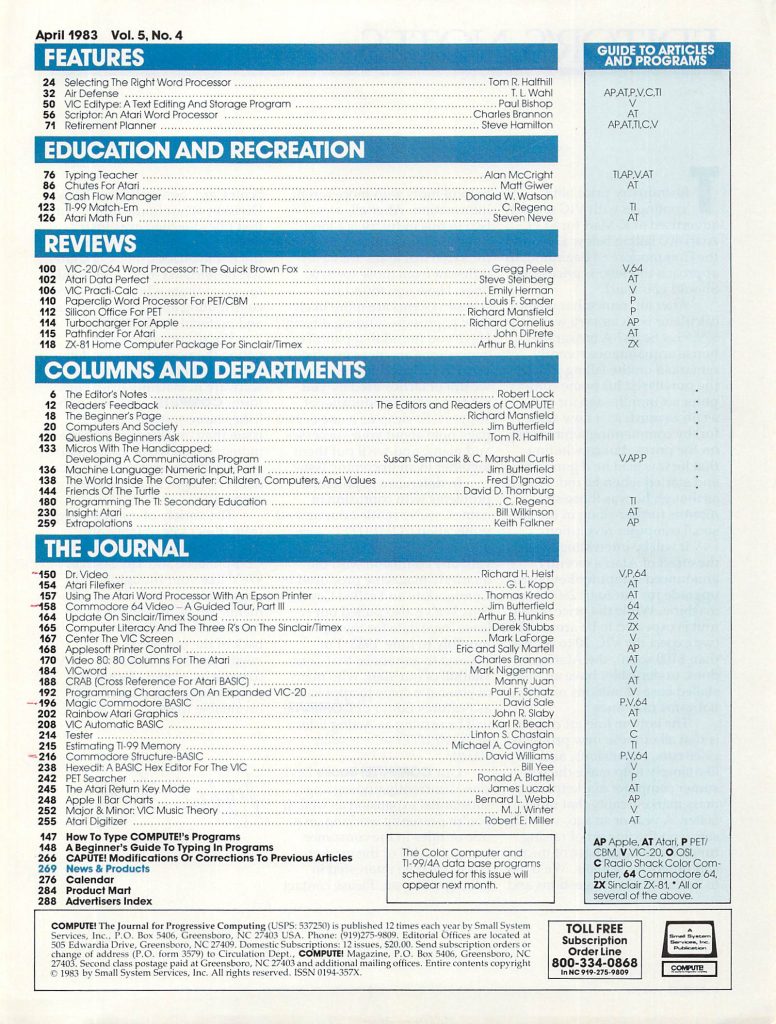
Columns and Departments
- The Editor’s Notes – This month’s editorial discusses the rapidly falling prices of computers.
- Readers’ Feedback – Questions and comments from readers about using a TV as a monitor, incompatibilities with Atari’s “Revision B” of their OS, and translating programs to the TI-99/4A among other things.
- The Beginner’s Page – A column for computer beginners, this month starting a series discussing the various categories of software (music and graphics are covered here).
- Computers And Society – The best and worst of the Winter CES. The worst was the introduction of x-rated software including games for the Atari 2600, the best (at least according to this article) were games with unique goals. One example given is Choplifter in which you get points for rescuing people as opposed to blowing things up.
- Questions Beginners Ask – Questions answered about typing in programs and the differences between a TV and a monitor among other topics.
- Micros With The Handicapped: Developing A Communications Program – Yes, “handicapped” was the politically correct term then even if it isn’t now. Anyway, this is part 4 of a continuing series with type-in programs included for making communication easier.
- Machine Language: Numeric Input, Part II – The second part of a Jim Butterfield article on inputing decimal numbers with machine language programs.
- The World Inside the Computer: Children, Computers, And Values – An article that contemplates a child becoming friends with a computer.
- Friends of the Turtle – Sounds like some kind of secret organization, but no, this is just an article on programming in PILOT, a Logo derivative, on the Atari. Recursion in particular is discussed.
- Programming the TI: Secondary Education – An article about the secondary education software available for the TI-99/4A.
- Insight: Atari – Atari 8-bit computer discussion including news about Atari COBOL and a few programming tricks.
- Extrapolations – A type-in program that lets Apple II users load BASIC programs for PET/CBM computers from tape.
The Journal
- Dr. Video – A type-in program for adding additional capabilities to the screen editing abilities of the PET/CBM including the ability to clear the screen above or below the cursor and sending the cursor “home” (to the bottom left of the screen).
- Atari Filefixer – A type-in program that serves as a tool for editing data files for machine language programs. At least that’s what I think it is for.
- Using the Atari Word Processor With An Epson Printer – This article describes how to add Epson MX-80 compatibility to the Atari World Processor.
- Commodore 64 Video – A Guided Tour, Part III – Part 3 of a Jim Butterfield series on the Commodore 64’s video capabilities. This one discusses creating and moving sprites.
- Update On Sinclair/Times Sound – An update and fixes to a previously published sound program for the Timex 1000/Sinclair ZX-81.
- Computer Literacy And The Three R’s On The Sinclair/Timex – A series of small type-in programs for the Timex/Sinclair that teach some simple computer literacy and math.
- Center The VIC Screen – Apparently the VIC-20 screen would sometimes not be centered when displayed on a TV. This small program helps you to center the screen and can be added to your own programs.
- Applesoft Printer Control – This is a type-in program for making the selection printer mode (typeface, etc.) simpler.
- Video 80: 80 Columns For The Atari – By default, the Atari 8-bit computers could only display 40 columns of text. This is a type-in program that works as a software solution to increase that to 80. This doesn’t actually increase resolution so the quality won’t be as good as a hardware solution but it was still quite useful.
- VICword – A type-in program that gives you shortcuts for 52 BASIC commands. For example, it lets you hold down SHIFT and press ‘L’ to type LOAD instead of having to type the whole command.
- CRAB (Cross Reference For Atari BASIC) – A very short type-in utility that will print a list of all the variable used in a given BASIC program and on which line numbers they appear on.
- Programming Characters On An Expanded VIC-20 – Defining and using a custom character set on the VIC-20. Memory expansion is needed.
- Magic Commodore BASIC – BASIC programming tricks for the PET/CBM, VIC-20 and Commodore 64, including invisible lines, backward line numbers, highlighting REM statements and more.
- Rainbow Atari Graphics – Various techniques for using colors in games on Atari 8-bit computers.
- VIC Automatic BASIC – A type-in program for creating text animation and prompts that can be used in your own programs.
- Tester – A simple program for the TRS-80 that can be used for testing. Essentially, it asks a series of questions and gives multiple choice answers then grades you. It can easily modified with your own questions.
- Estimating TI-99 Memory – Memory was highly constrained in old 8-bit computers and it was easy to run out of it. This article gives you some techniques to estimate the array sizes you can use.
- Commodore Structure-BASIC – A program for simulating structured programming on Commodore computers.
- Hexedit: A BASIC Hex Editor For The VIC – A type-in program that lets you do hexadecimal-decimal conversion and to create machine language programs on your VIC-20.
- PET Searcher – A type-in program for searching random access files for a string on your PET/CBM computer.
- The Atari Return Key Mode – A program that lets you write self modifying code on your Atari 8-bit computer.
- Apple II Bar Charts – A type-in program that serves as a tool for creating bar charts on the Apple II. Up to 30 bars can be created in one chart. It also provides options for printing.
- Major & Minor: VIC Music Theory – A music type-in program for the VIC-20. It is an educational program that teaches keys, signatures and scales.
- Atari Digitizer – A type-in program for drawing with your joystick on Atari 8-bit computers.
…and LOTS more!


