• Tag Archives Dell
  • Digital Archaeology: Dell XPS Gen2

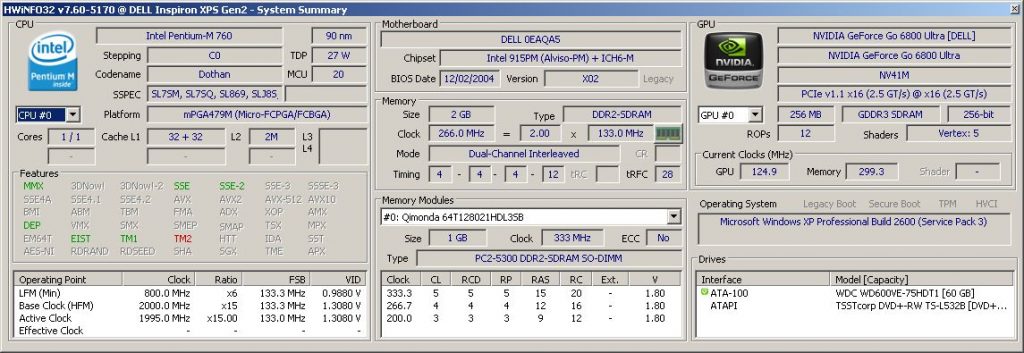
    The XPS Gen2 is a fairly high end gaming laptop from Dell that was introduced in February of 2005. What was high end? In this case, it was a 2 GHz Pentium M, 2 GB of RAM and an nVidia GeForce Go 6800 Ultra. The nicest aspect from my point of view is the beautiful 4:3 aspect high resolution screen with a 1920×1200. Specs include:

    • CPU: Intel Pentium M 720 @ 2 GHz (Dothan)
    • GPU: nVidia GeForce Go 6800 Ultra (NV41M)
    • RAM: 2 GB DDR2-266
    • Screen: 17-inch @ 1920×1200
    • Optical Drive: TSSTcorp DVD+-RW TS-L532B

    For a more complete hardware inventory, see the output of HWiNFO or CPU-Z.
    As you can imagine, at 17-inches, this is a large laptop. It also features Alienware like lighting effects. There are three lighting zones that can be set via the Dell QuickSet app. Even without the app, there are a variety of preset colors in the BIOS that can be used. The zones include the speakers (front), fans (rear base), and back panel (XPS logos on the back of the LCD). However, there is no keyboard backlighting which would have looked nice AND been useful. In any case, it definitely stands out in a see of generic looking laptops.

    The Pentium M seems to less commonly be used in gaming laptops than other CPU choices of the time (mainly the Pentium 4 or Pentium 4-M). I’m not sure why. The Pentium M was faster on a MHz per MHz basis. I suppose at the time the fastest Pentium 4s (especially if we are talking desktop versions) were a bit faster than the fastest Pentium Ms but not by much and at the cost of a whole lot more power. Personally, I think the Pentium M was a better choice for a laptop, even for gaming. In fact, the XPS Gen2 appears to be the successor to the original XPS which was Pentium 4 based. The XPS Gen2 was originally available with an option of only two different processors. Either the 2.13 GHz Pentium M or the 2 GHz Pentium M (which is what this one has). Both included the nVidia GeForce Go 6800 Ultra.

    The nVidia GeForce Go 6800 Ultra was essentially the same as a regular GeForce Go 6800, just clocked higher. At its release it was probably the fastest laptop GPU available. It definitely makes this laptop great for some old school (circa 2003-2008) gaming.

    My particular unit has a couple of odd quirks. That may come down to the fact that this appears to have been an early engineering sample. At least there is a sticker on the bottom that says “This machine is for DELL internal use only. This machine has not been tested for compliance with FCC radio emission standards. This machine is not, and may not be offered for sale or lease, or sold, or leased.” Another indicator is the BIOS revision. Generally, Dell’s BIOS versions start with an ‘A’ (e.g. A2, A17, etc.). The BIOS version in this laptop is ‘X2’. It also features a ‘debugging’ menu to enable.

    There’s also an odd behavior that may or may not have something to do with the early (perhaps beta) BIOS version. When I first got this laptop it had no hard drive so I put one in and loaded it up with a fresh install of Windows XP SP3. I also installed official Dell drivers for the video, chipset, and everything else. However, for some reason, the CPU was running at an extremely slow speed. Something like 600 MHz on average. No matter what BIOS options I chose or what else I did, it was stuck at the lowest multiplier and even seemed to be throttling the bus speed. I thought it might be a thermal issue but this laptop seemed to be lightly used and there was almost no visible dust in the fans. Plus, the Pentium M is a fairly cool running processor so something would have to be pretty off to make it overheat. However, this laptop is pretty old so the thermal paste (or whatever they used) that’s on the heatsink probably isn’t in that great of a condition.

    Still, I doubted this was a thermal issue so I looked online to see what others have done with similar problems. I followed a couple of suggestions like loading BIOS defaults and disabling Speedstep but nothing changed the behavior. Then I tried downloading Throttlestop which is an app that can be used to manually control things like voltages and certain throttling and power saving options. However, it does not seem to support Pentium M processors. After some more searching I found an app called RightMark CPU Clock Utility. Though the options were a little confusing, after a few minutes I found that I could change a profile to use the maximum “P-state transition” (basically the multiplier) and then apply that profile. Now the processor was running at the expected 2 GHz. It’s been running this way for several days doing CPU intensive tasks so I think I can rule out thermal issues. It’s just that I need the app to make it do so.

    One last quirk (that I’ve noticed so far) is that the fans seem to run at full speed (or at least they are pretty loud). It did this even before I got the CPU speed to its normal rate so again I don’t think this actually has anything to do with thermals. I know there are utilities that let you control fan speed out there but I haven’t tried those yet. But for all I know, this is the norm for this laptop as I don’t have another to compare it to.

    I don’t know for certain that these oddities are caused by the apparently early BIOS version but I suspect it. I initially tried to upgrade the BIOS but it refused to update because the battery is non-functional. There is a force flag that you can use that is supposed to bypass that check but it does not work for some reason. Since I have a workaround for the problem anyway, I probably won’t try to update the BIOS. This ‘X2’ revision is probably fairly unique anyway so it’s nice to keep it to play around with.

    Once I got everything settled and working properly, I installed BOINC and attached to all of my usual projects (the ones that would work anyway). BOINC on Windows XP still works with a surprising number of projects. So far it has successfully completed work for Einstein@home, World Community Grid, and Asteroids@home. There are probably other projects I don’t participate in that would work also. You can see how this laptop is doing overall at FreeDC.


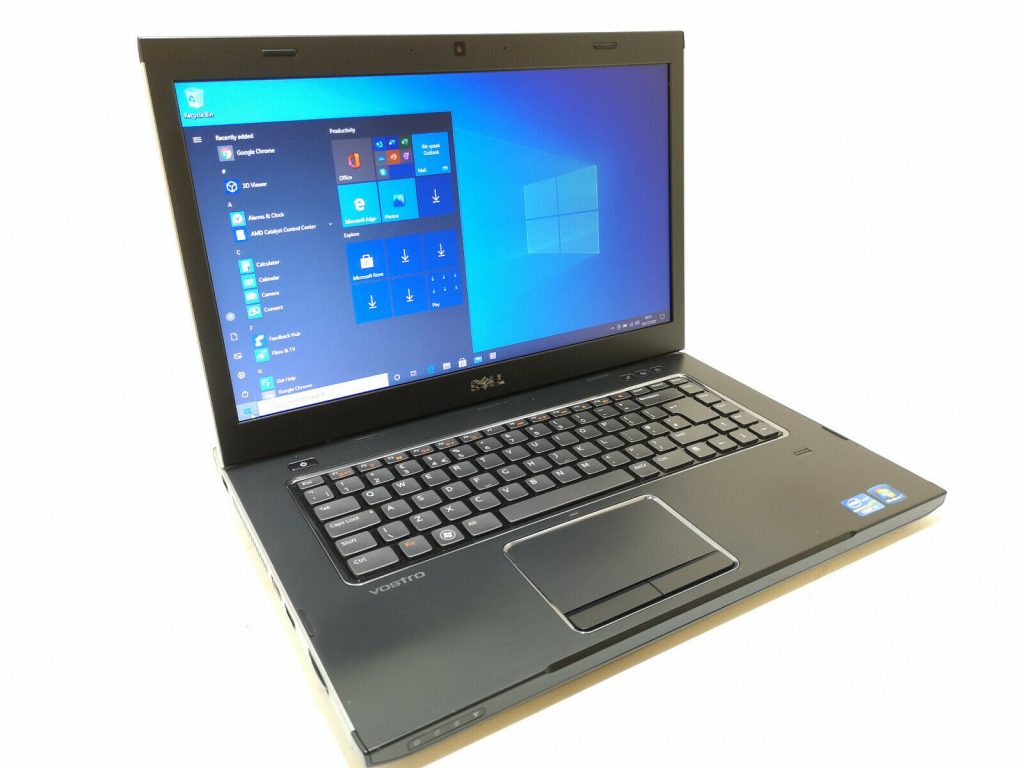
  • Digital Archaeology: Dell Vostro 3550

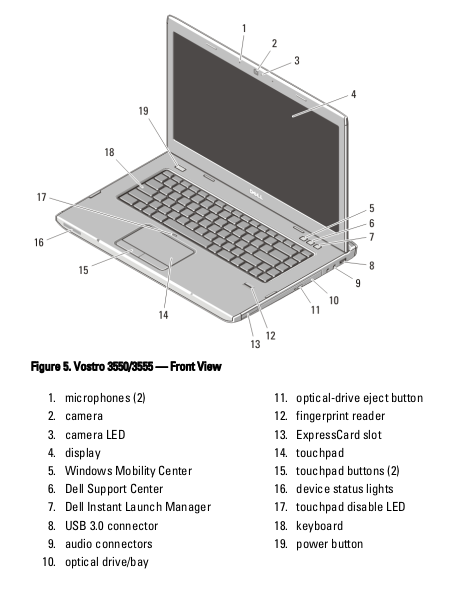
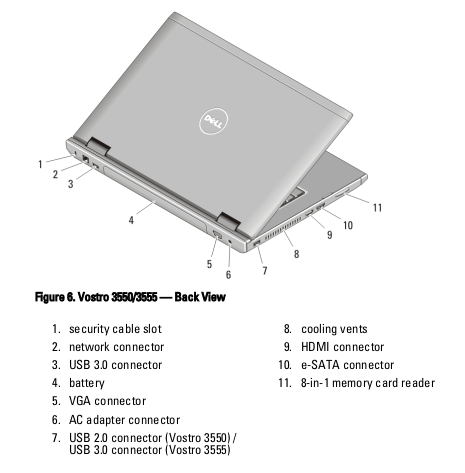
    The Dell Vostro 3550 is one of the newer laptops I’ve looked at. A Sandy Bridge era processor and 6 GB of RAM make it quite usable today even if it is getting kind of old. It’s basic stats include:

    • CPU: Core i7-2640M @ 2.8 GHz
    • RAM: 6 GB DDR3-10600
    • Graphics: ATI Radeon HD 6650M
    • Screen: 1366×768

    For more details, check out the output of HardInfo, HWiNFO, and/or CPU-Z.

    This laptop originally shipped with Windows 7 so to me it certainly isn’t “vintage” and it’s a stretch to call it “retro”. However, Windows 7 was introduced more than 15 years ago and mainstream support ended around 10 years ago. It was only around a few years before the unpopular Windows 8 was released. It’s a shame that Windows 7 had such a short life (well, compared to Windows XP anyway). It was probably Microsoft’s best OS next to XP. The Vostro 3550 itself was released well over a decade ago in 2011 so it fits into that sort of arbitrary age of at least 10 years that I chose as being the minimum for calling something “retro”.

    The Vostro line always seemed a bit superfluous to me. I guess Dell ultimately decided the same as they discontinued it in 2013. Dell had (and still has) the XPS and Alienware lines for gaming/multimedia/entertainment, Latitude for business, Precision for workstations and Inspiron for their mainstream consumer line. The Vostro line was supposed to be a low cost business line, sort of an Inspiron dressed up as a business machine.

    Like most laptop models, the Vostro 3550 came in several configurations with different CPU, RAM, and GPU options (among others). This particular one was the top of the line configuration. However, it still wouldn’t be classified as high end. The CPU, though an i7, was a dual core, quad thread model. The ATI Radeon HD 6650M would probably be classified as a mid-range card for a laptop. It was a dedicated GPU with its own RAM and performance was good enough for most games of the time though often not at the highest detail.

    For modern usage, the worst feature is probably the low res screen. I’ve been spoiled by 1080p and above screens and it is hard to go back. 1366×768 just isn’t enough.

    To me, the Vostro line fit better as an alternate to the Inspiron line for those that wanted a bit of a more understated design. I’m pretty sure that the internal hardware was probably the same or mostly the same as Inspiron models from the same time period. I guess it made sense for businesses trying to by hardware as cheap as possible but if you were really buying for a business it just seems like you were better off spending a little more and buying something from the Latitude line. I think they came with better support and warranty options anyway.

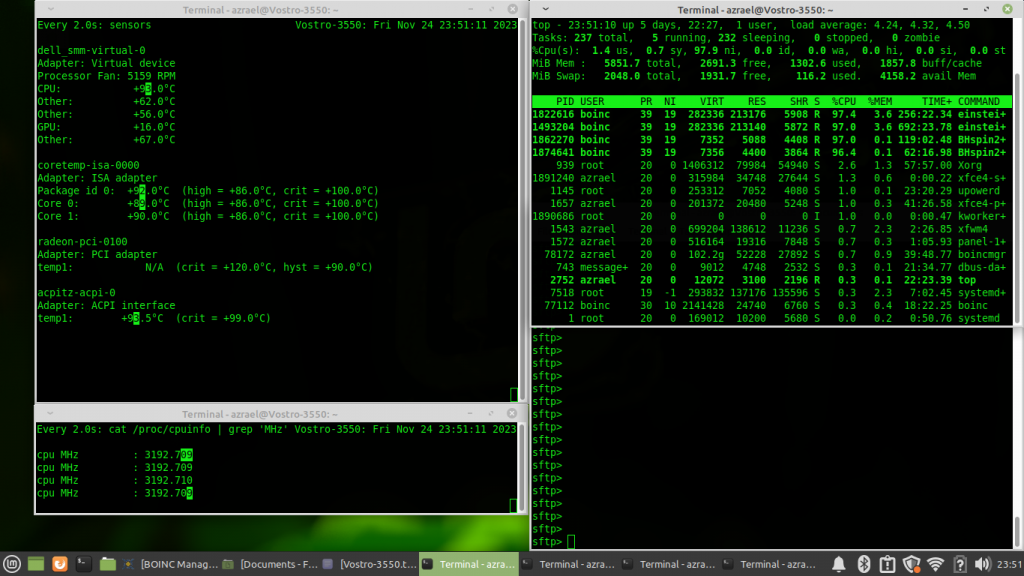
    My particular laptop recently developed an issue where it would go to sleep or shutdown almost immediately after starting up. I was able to circumvent the problem by switching to Linux. However, I believe the issue is with the battery. It does not charge at all but it behaves a little oddly even in Linux. I frequently get a pop-up that says “Your Battery is charging”. Simply removing the battery would likely solve the problem I was having in Windows (and get rid of the pop-up I’m seeing in Linux).

    Like all the hardware I power up, this laptop is running various BOINC projects. Having a 64-bit CPU and sufficient RAM means it can do work for all of the projects I normally participate in including Einstein@home, Rosetta@home, Asteroids@home, MilkyWay@home, Universe@home and World Community Grid. You can check out how it is doing overall at FreeDC.


  • Digital Archaeology: Dell Vostro 230

    The Vostro line from Dell was a low cost business line of desktops and laptops. Many times they were slight variations of Inspiron models internally with a different external design. Generally Vostros, whether laptop or desktop models, were all black with blue lighting. The Vostro 230 is no exception. This model (or at least my variant) features a Core 2 Quad processor. The original configuration included 3GB of RAM a 500GB hard drive used the integrated motherboard Intel video solution and shipped with Windows 7 32-bit. The current configuration includes the following:

    • CPU: Core 2 Quad Q8400 @ 2.66 GHz
    • RAM: 8 GB DDR3-1333
    • Video: HIS HD 5550 Silence 1 GB (I think)
    • SSD: Kingston 60GB

    See the output of HardInfo for more details on the hardware.

    The discrete GPU though not a particularly high performing model is still a significant improvement over the Intel graphics on the motherboard. The SSD is significantly smaller but also significantly faster than the original hard drive. The 8 GB maxes this machine out. This machine is certainly capable of running a modern OS such as Windows 10 or Linux. I have Xubuntu installed currently and it feels plenty fast. If you really wanted to use this as a daily driver you would probably need to install a data drive. 60GB is really tiny by today’s standards…which is somewhat amusing as my first “PC” included a 340MB hard drive to which I later added a MASSIVE 1GB drive…

    The good news with this PC is that it seems to use pretty standard parts. Many times OEM systems, including many Dells, are proprietary in some way or another. In this case the power supply is a standard ATX model and even the motherboard seems to be easily swappable. In that sense, upgrades are pretty much only limited by what you can fit in the case.

    On the other hand, if you are just interested in adding a GPU, the existing power supply is going to be a big limitation as it is only 250 watts. That pretty much limits you to cards that don’t require an external power connector. Something like a GT 1030 would probably be a good match for this system if you wanted to do some semi-modern gaming.

    As I mentioned above, the RAM is already maxed out at 8 GB which is enough basic tasks and older games. The CPU is already a fairly decent model. It can be upgraded to a Core 2 Quad Q9550 which is a couple of hundred MHz faster and includes a significantly larger L2 cache. However, it will probably give you less than a 10% bump over the Q8400 that’s already installed. Many Vostro 230s shipped with slower Core 2 Duo CPUs so in those cases the upgrade would be well worth it.

    Like all the machines I run, this one is running BOINC and crunching tasks for various projects. Having a 64-bit CPU and running a modern OS means it can do work for just about all available projects. Currently, this one is crunching tasks for Einstein@home, Milkyway@home, Rosetta@home, Asteroids@home, Universe@home and World Community Grid. You can see how it is doing overall at FreeDC.