• Tag Archives Turion
  • Digital Archaeology: Gateway M-1629

    When looking at another Gateway laptop almost exactly like this one in appearance I pondered when exactly when Gateway’s quality started to decline. I think it may have been with Core 2 Duo era laptops. While previous Pentium M and Turion 64 laptops (nearly identical in construction) may have lost some of the excitement of earlier models, they at least seemed pretty solid and of decent quality. The Turion based laptop I’m looking at here, while it has an attractive silver and red design, it also has a flimsier feeling keyboard and buttons. Still, I would say it holds up better than Dell Inspiron models of similar age.
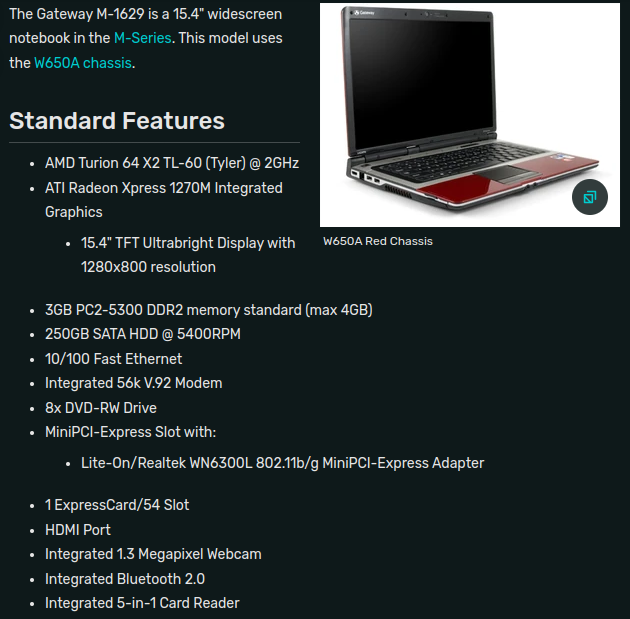
    The Gateway M-1629 I am looking at here has the following features:

    • CPU: AMD Turion 64 X2 TL-60 @ 2GHz
    • Memory: 3 GB DDR2-666/PC2-5300
    • Video: Radeon Xpress 1270M
    • Screen: 1280×800
    • Hard Drive: Western Digital ATA WDC WD3200BPVT-6 (320 GB)
    • Optical Drive: Optiarc DVD RW AD-7560A

    Check out the output of HardInfo for a more complete look at the hardware.

    This is a lower-end laptop. The CPU is an AMD model which tended to be put in lower end machines because they were cheaper. However, this particular model is quite a bit faster than a similar Pentium (Core 2 Duo variant) laptop I looked at recently. Of course, the Pentium is typically clocked lower and has less cache than a Core 2 Duo. MHz for MHz a Core 2 Duo will be faster but also more expensive. The Turion 64 X2 is based on the K8 architecture so it is essentially the same thing as an Athlon 64 X2 only designed for laptops. The CPU is socketed so theoretically it could be upgraded to a TL-68 model running at 2.4GHz.
    The video hardware is also low end. The Radeon Xpress 1270M is integrated with the chipset and shares system memory. I suppose it is technically a little better than the equivalent Intel solutions at the time but it hardly matters. Neither was sufficient for what would have been modern gaming at the time.
    Vista was the version of Windows that shipped with this laptop. I’m not sure if it was the 32-bit or 64-bit version. It seems like the 32-bit version was typically included as the default install because 64-bit drivers were somewhat less available. Some users likely would have downgraded to Windows XP as well assuming drivers exist to support the hardware. Windows 7 and/or Windows 8 are probably the best choices for a Microsoft OS for this laptop. Any of those are fine for retro use but if you really plan to use it in a modern context then Linux would be the best choice.

    With a low-ish end CPU and a video solution that is near the bottom of the barrel, this was definitely a laptop for bargain hunters. Still, having two cores and a 64-bit processor it is really still good enough to run a modern OS. The cap of 4GB of RAM is actually the biggest limitation. Windows 10 really does better with 8 GB, especially when the rest of your hardware is already low end. However, I’m running a modern version of Xubuntu and it does fine. Web browsing is problematic because modern web browsers are such memory hogs. However, if you stick to 1 or 2 tabs then it is usable, if not exactly snappy. For some reason Firefox, the default browser in Xubuntu, is extremely laggy and seems to constantly eat CPU cycles. Brave does quite a bit better and there are lighter browsers available.

    It’s also still good enough to run BOINC and most projects, at least the ones I am most interested in. You can see how it is doing in Einstein@home, Asteroids@home, and Universe@home or see how it is doing overall at FreeDC.

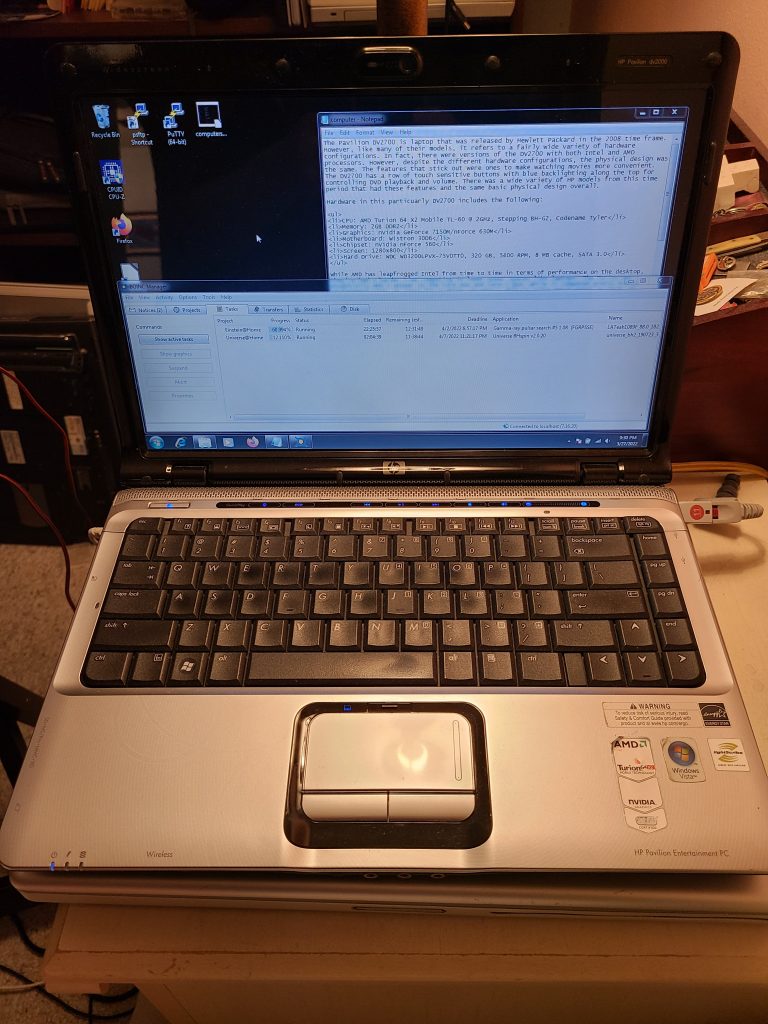
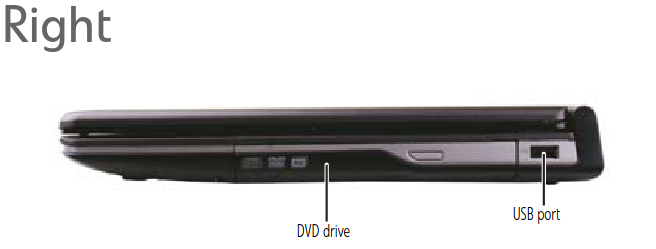
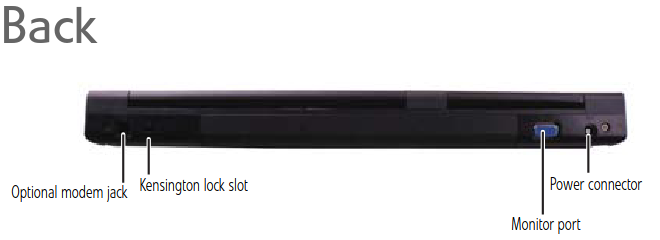
    The photo at the top and the specs image were taken from The Gateway Computers Wiki. The other images are from the user manual.


  • Digital Archaeology: HP Pavilion DV2700

    The Pavilion DV2700 is laptop that was released by Hewlett Packard in the 2008 time frame. However, like many of their models, it refers to a fairly wide variety of hardware configurations. In fact, there were versions of the DV2700 with both Intel and AMD processors. However, despite the different hardware configurations, the physical design was the same. The features that stick out were ones to make watching movies more convenient. The DV2700 has a row of touch sensitive buttons with blue backlighting along the top for controlling DVD playback and volume. There was a wide variety of HP models from this time period that had these features and the same basic physical design overall.

    Hardware in this particular DV2700 includes the following:

    • CPU: AMD Turion 64 X2 Mobile TL-60 @ 2GHz, Stepping BH-G2, Codename Tyler
    • Memory: 2GB DDR2
    • Graphics: nVidia GeForce 7150M/nForce 630M
    • Motherboard: Wistron 30D6
    • Chipset: nVidia nForce 560
    • Screen: 1280×800
    • Hard Drive: WDC WD3200LPVX-75V0TT0, 320 GB, 5400 RPM, 8 MB cache, SATA 3.0

    While AMD has leapfrogged Intel from time to time in terms of performance on the desktop, they’ve had a harder time competing in lower power spaces like laptops. The Turion was essentially AMD’s answer to the Core Duo and Core 2 Duo. While it competed pretty evenly performance wise, at least for a while, it wasn’t able to quite match Intel in terms of lower power consumption. This CPU performed roughly the same as a 1.9 GHz Core Duo.

    There were two versions of the TL-60. The first was code-named Trinidad, built on a 90nm process and had a 35 watt TDP. The second version (the one in this laptop) was code-named Tyler, built on a 65nm process and had a 31 watt TDP. Otherwise they were essentially identical. These were based on the K8 architecture with minor modifications so they were more closely related to the Athlon 64 line than the Phenom line.

    The chipset, or more specifically the built-in GPU made it difficult to find drivers for. Depending on the OS, they seemed to be non-existent or a closely guarded secret. I first tried installing a recent version of Ubuntu and failed miserably. All I could get was a blank screen (or maybe it was a scrambled screen…I forget now). I spent quite some time trying to get it to work but couldn’t. I tried the default Noveau drivers and every nVidia driver version I could find and nothing worked. After trying another distribution or two, I finally got Debian to work…kind of. It still required manual alteration of config files and I could only get a 1024×768 resolution instead of the native 1280×800. That seemed to be the best I was going to get with Linux. Perhaps with an old enough distribution and old enough nVidia drivers I would have better luck…

    Instead, I decided to give Windows a try. Originally, this laptop came with Windows Vista (almost certainly the 32-bit version despite having a 64-bit chip). It also, in theory, supported Windows XP. And it was also likely possible to install Windows 7 on it. Windows 10 might work with more RAM…maybe…but I wasn’t going to put in more RAM at the moment and even if I did it would probably be painfully under-performing. I didn’t really want Vista and while I love XP I felt something a bit newer was better for this laptop so I decided to go with Windows 7.

    Installation went fine and it was immediately operable. But again, the resolution wasn’t right and it didn’t have correct drivers for the video (and a few other things). Finding the right nVidia drivers turned out to be more difficult than it should have been. Normally, you can go to nVidia’s web site, choose the appropriate category and find the drivers you need. However, the 7150M/630M seemed to be a black sheep of the family or something. No selection combination produced drivers that were appropriate. I finally found a link somewhere else for the correct drivers (back to an apparently obscure nVidia page no less) and once I installed them, things worked fine and I could finally get that 1280×800 resolution.

    It wasn’t too long before this chipset was released that AMD bought ATI. That probably explains to some degree why this chipset had a relatively short life and little support. That and it really wasn’t that great of a performer, at least as far as the GPU was concerned. It was better than Intel’s built-in graphics of the same time period but that really isn’t saying much. It only supported DirectX 9.0c and there’s only so much you can do with 2 pixel shaders, 1 vertex shader, 2 texture mapping units and 2 ROPs. Even at the time that was pretty lousy.

    When I acquired this laptop, it had 2 GB of RAM. However, given the fact that the two modules were different brands and had different specs, I’m pretty sure it came stock with 1 GB when new and was later upgraded. One GB seems a less than ideal amount for Windows Vista. Even 2 GB can be a struggle with modern web browsing on Windows 7 and Windows 7 is a bit more efficient with RAM than Vista. Having said that, I know that some computers that came with Vista (basic) only had 512 MB. Sounds like torture to me.

    For detailed specs, see https://www.megalextoria.com/DigitalArchaeology/da_Pavilion-DV2700/PAVILION-DV2700.HTM


  • Digital Archaeology: HP Pavilion DV6000 (GA456UA-ABA)

    The HP Pavilion dv6000 actually consisted of a number of different laptop models. In fact, other than to give you an idea of the laptop size, dv6000 isn’t very useful as a model number. This particular one is sub-modeled (is that a word?) GA456UA-ABA. The primary feature that differs between these different sub-models is the CPU and supporting chipset. In this case, the CPU is a Turion 64 x2 TL-56.

    The Turion 64 X2 line was AMD’s answer to the Core 2 Duo, however, their naming convention left something to be desired. AMD released mobile AMD 64 X2s and Turion 64 X2s during the same time period and they could be hard to differentiate. Generally speaking, Turion’s were lower power (though later mobile Athlon’s matched that) and generally Turion’s had more cache (though not in every single instance…it depended on the specific model). But generally speaking, you can think of a Turion 64 X2 as a mobile version of the Athlon 64 X2 (K8 generation). The TL-56 model runs at 1.8 GHz and has a total of 1 MB of L2 Cache. But to confuse matters further, there are two variants of the TL-56. One is the older “Trinidad” 90mm variant and the other is the newer “Tyler” 65nm variant but there isn’t much difference to speak of anyway.

    The dv6000 is labeled an “Entertainment PC” and includes a row of blue LED touch sensitive buttons above the keyboard for adjusting volume and controlling DVD play. It also has “Altec Lansing” branded speakers which were presumably a step above your typical unbranded laptop speakers. As far as graphics go, this dv6000 has the GeFore Go 6150. This nVidia chip was integrated with the motherboard chipset and was among the lowest end nVidia choices of the time. Having said that, it was good enough for some basic gaming and better than what was in a lot of other laptops of the time. It at least beat out the integrated solutions of ATI/AMD and Intel.

    However, the GeForce Go 6150 was one of a myriad of nVidia chips of that era that were faulty. A combination of the solder used along with the pad beneath led to heat expansion that cracked the solder joints. The solder could be reflowed but that was only a temporary fix. The fact that this laptop seems to work just fine may be a small miracle or maybe it was a later production model with the problem at least partially addressed.

    Some basic specs of this laptop include:

    • CPU: Turion 64 X2 TL56 @ 1.8 GHz
    • RAM: 2 GB of DDR2 @ 667 MHz
    • GPU: GeForce Go 6150 using up to 128 MB of system RAM
    • Screen Resolution: 1280×800
    • Hard Drive: ST320LT020-9YG14 (Seagate Momentus Thin 320 GB)
    • Optical Drive: TS-L632M 8x DVD±RW LightScribe Drive

    It also has the ports you would expect including a three USB ports, a memory card slot, an express card slot, as well as your typical wi-fi, and ethernet connections available. It looks like it also has VGA out, SVIDEO out, a modem (any dial-up ISPs still around?) and firewire.

    The “Lightscribe” drive is an interesting feature in that it lets you flip a disk over and laser etch a label. However, this required special disks and I don’t think these are widely available any longer. Alas, optical drives seem to be quickly going the way of the floppy anyway. I also like the handy button to turn off the trackpad. I like to rest my hands in the area below the keyboard while I am typing and if the trackpad is enabled, the pressure inevitably causes the cursor to move around and make me end up typing (or deleting) somewhere I didn’t want to.

    Currently I have Xubuntu 20.04 installed which it handles reasonably well. Another 2 GB of RAM would probably help a lot. With only 2 GB, your browsing capabilities are going to be limited. Firefox runs ok but I wouldn’t try more than one or two tabs. If I really wanted to upgrade it I would probably add that memory and an SSD and it would feel pretty zippy for a laptop that is approaching 15 years old.

    Overall, this seems like a pretty nice little laptop for AMD fans back in the day. A backlit keyboard would have been nice and if you were one of the unlucky many struck with the faulty GPU problem you no doubt would have hated it but otherwise it’s pretty decent as long as you weren’t looking for a gaming powerhouse.

    Check out the output of HardInfo for a more detailed inventory of the hardware.